Introduction to Webhook Integrations for Custom ERPs
In today's digital age, small and medium-sized businesses (SMBs) in India are increasingly looking to streamline their operations by integrating advanced technologies like artificial intelligence (AI). One such technology is voice AI, which can significantly enhance customer interaction and operational efficiency. This guide will focus on how developers can use webhook integrations to connect custom Enterprise Resource Planning (ERP) systems with voice AI platforms, specifically using VaaniAI as an example.
Understanding Webhooks and Their Importance
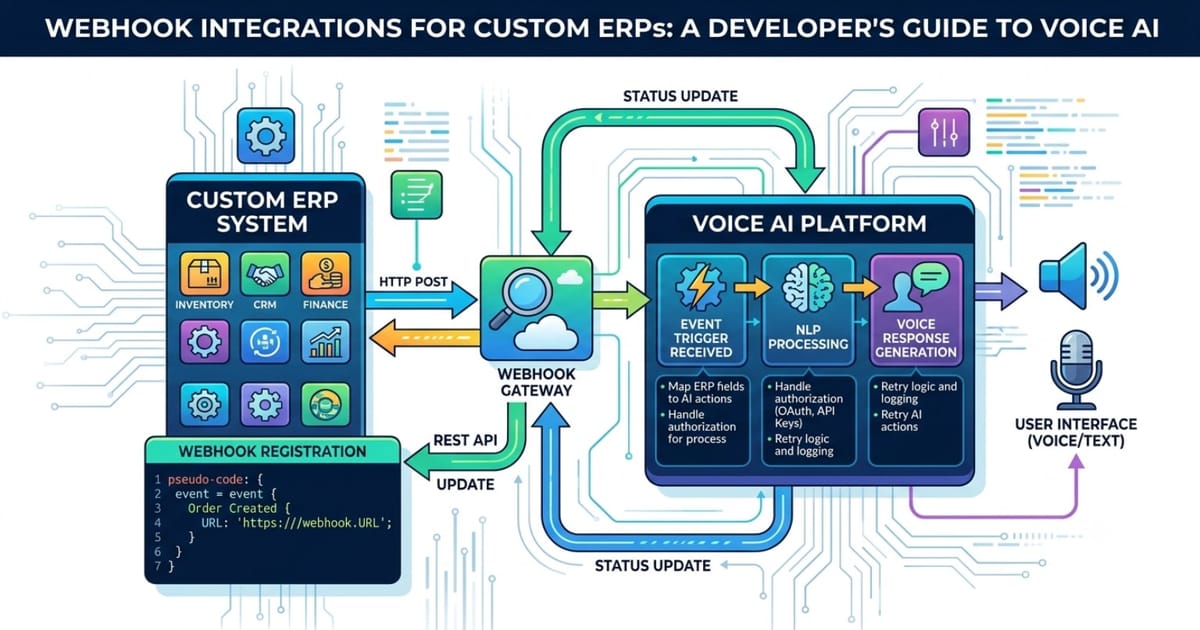
A webhook is essentially a way for applications to communicate with each other in real-time. Instead of having one application poll another for updates, a webhook sends data automatically when specific events occur. For custom ERPs, this means that whenever there is a change or update, it can be instantly communicated to a voice AI system like VaaniAI, ensuring that the information is always up-to-date and accurate.
Why Use Webhooks?
- Real-Time Data Synchronization: Webhooks ensure that your ERP and voice AI systems are always synchronized, providing real-time updates.
- Efficiency: By reducing the need for manual data entry and frequent checks, webhooks can save time and resources.
- Scalability: As your business grows, webhooks can easily scale to handle more complex interactions without additional effort.
Setting Up Webhook Integration with VaaniAI
To set up a webhook integration between your custom ERP system and VaaniAI, follow these steps:
Step 1: Identify Key Events
The first step is to identify the key events in your ERP system that you want to trigger actions in VaaniAI. These could include order placements, inventory updates, or customer feedback submissions.
Step 2: Define the Webhook Endpoint
Create a webhook endpoint in your ERP system where VaaniAI can send notifications. This endpoint should be designed to receive JSON payloads and process them accordingly.
Step 3: Configure VaaniAI
Log into your VaaniAI account and navigate to the integration settings. Here, you can configure the webhook URLs for different events. Make sure to specify the correct HTTP method (GET, POST, etc.) and any required headers or authentication methods.
Step 4: Test the Integration
Once everything is set up, test the integration thoroughly to ensure that the webhooks are working correctly. Simulate different scenarios to verify that the data is being sent and received accurately.
Practical Tips for Successful Integration
Use Robust Error Handling
Error handling is crucial when dealing with webhooks. Ensure that your system can handle failed requests gracefully and retry them if necessary. This will prevent data loss and ensure that your ERP and voice AI systems remain in sync.
Monitor Performance Regularly
Regular monitoring is essential to keep track of the performance and reliability of your webhook integration. Set up alerts for any issues and regularly review logs to identify and resolve problems quickly.
Leverage Security Measures
Security is paramount when setting up webhooks. Use secure HTTPS connections and implement authentication mechanisms like API keys or OAuth tokens to protect your data.
Conclusion
Integrating your custom ERP system with a voice AI platform like VaaniAI using webhooks can bring significant benefits to your business. From real-time data synchronization to improved efficiency and scalability, the advantages are clear. By following the steps outlined in this guide and adhering to best practices, you can successfully set up and maintain a robust webhook integration.
Call to Action
If you're ready to take your business to the next level with advanced voice AI capabilities, sign up for VaaniAI today. Experience the power of seamless integration and transform the way you interact with customers and manage your operations.