CRM में leads जोड़ें
संक्षेप में: Unified CRM → Add Lead से एक व्यक्ति जोड़ें: नाम, फ़ोन, source, stage, group, notes और आपकी industry के fields। कई leads एक साथ जोड़ने के लिए Bulk CSV Import, और लगातार आने वाली leads के लिए Google Sheets या API इस्तेमाल करें। एक फ़ोन नंबर दो बार नहीं जुड़ता।
VaaniAI का step-by-step गाइड। VaaniAI एक AI voice agent platform है जो businesses के लिए हिंदी, English, Hinglish और दूसरी भारतीय भाषाओं में phone calls करता और उठाता है। Updated .
स्टेप बाय स्टेप
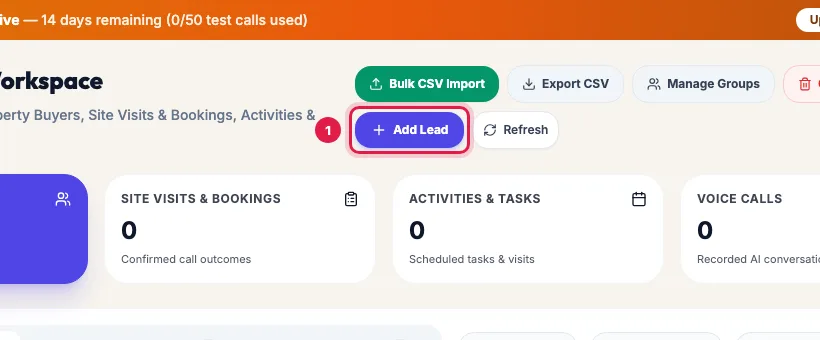
Unified CRM खोलें और Add Lead पर क्लिक करें (बटन पर आपकी industry का शब्द हो सकता है)। कई leads एक साथ जोड़नी हों तो Bulk CSV Import इस्तेमाल करें।
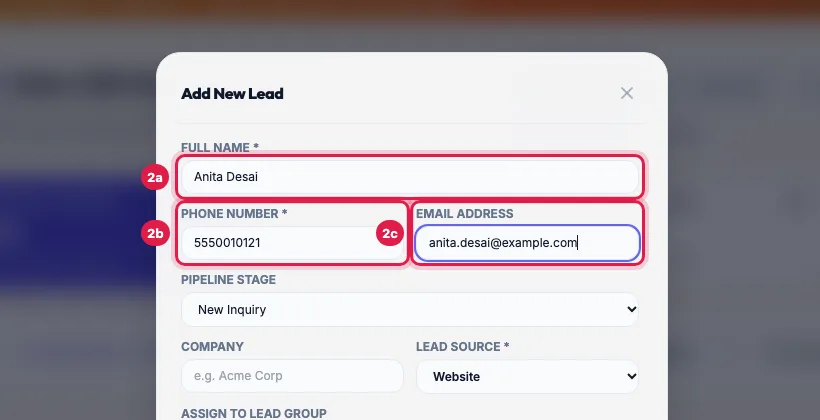
Full Name और Phone Number भरें: भारत के लिए 10 अंक, या +91 के साथ। Email Address ज़रूरी नहीं है।
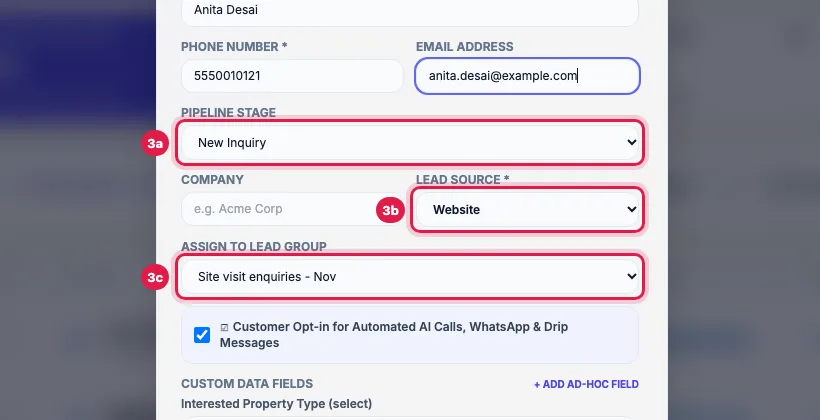
Pipeline Stage (नई lead के लिए पहला stage, जैसे New Inquiry), Company हो तो, Lead Source (Website, Facebook, Instagram, WhatsApp, Referral आदि) चुनें, और lead किसी group की हो तो Assign to Lead Group में group चुनें।
Internal Notes में वह लिखें जो आपकी team या agent को पता होना चाहिए। Custom Data Fields में अपनी industry के fields भरें, जैसे budget और पसंदीदा location; + Add Ad-hoc Field से कोई और जानकारी नाम और value के साथ जोड़ें।
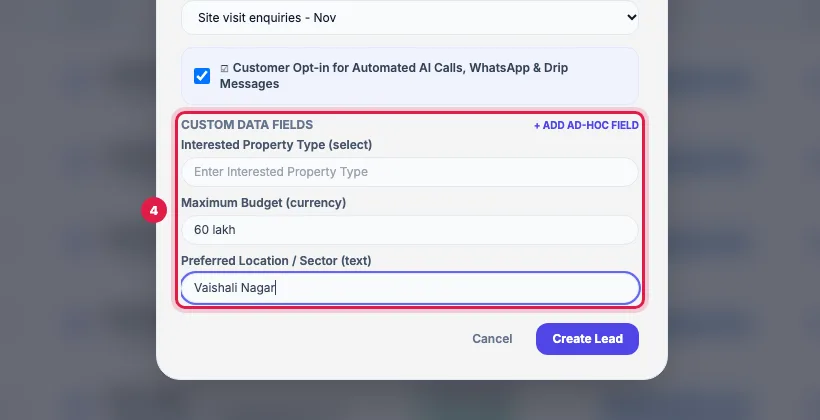
अगर व्यक्ति ने संपर्क की अनुमति दी है तो Customer Opt-in for Automated AI Calls, WhatsApp & Drip Messages पर tick रहने दें और Create Lead पर क्लिक करें। संदेश पुष्टि करता है और lead list में सबसे ऊपर दिखती है।

Leads आने के सभी रास्ते
- Add Lead: एक-एक व्यक्ति, walk-in और फ़ोन enquiry के लिए।
- Bulk CSV Import: .csv, .xlsx या .xls file, या Excel से paste की गई rows।
- Google Sheets: वह sheet जिसे आपका website form या team भरती है; नई rows अपने आप leads बनती हैं।
- Webhook और API: आपकी website, ad forms या दूसरे apps सीधे leads भेजते हैं।
Duplicate नंबर
एक फ़ोन नंबर एक ही lead है (आखिरी 10 अंकों से मिलान)। Add Lead पहले से मौजूद नंबर को मना कर देता है; file import या sheet उसी lead को update करते हैं।
Tips और पूरी जानकारी: How to Add Leads to an AI Calling CRM (One, Bulk or Automatic) (English)