संक्षेप में: AI Agents → agent पर Edit → Telephony DID & Concurrency: Primary DID चुनें और Save Changes पर क्लिक करें। यही नंबर agent की calls का caller ID बनता है और इस नंबर पर आने वाली calls का जवाब देता है।
VaaniAI का step-by-step गाइड। VaaniAI एक AI voice agent platform है जो businesses के लिए हिंदी, English, Hinglish और दूसरी भारतीय भाषाओं में phone calls करता और उठाता है। Updated .
स्टेप बाय स्टेप
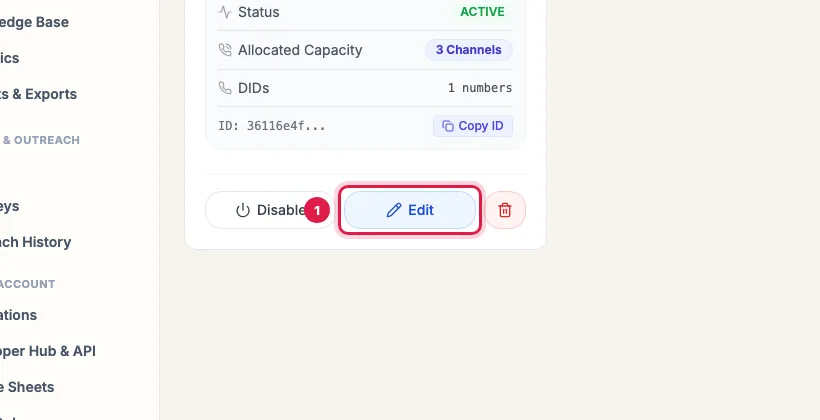
AI Agents खोलें और agent के card पर Edit पर क्लिक करें।
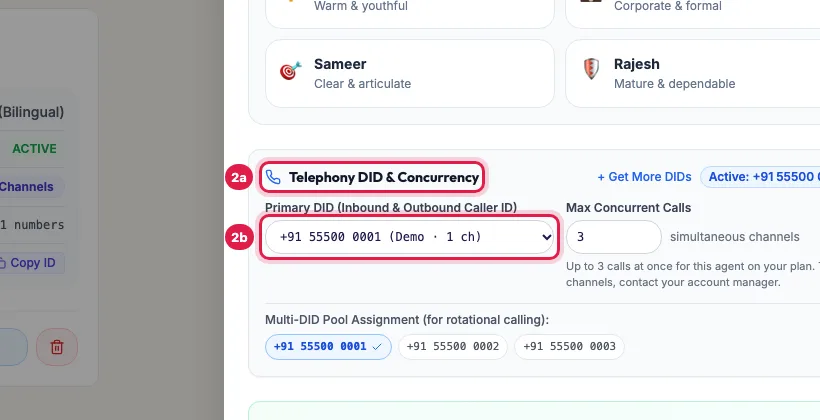
Panel में नीचे Telephony DID & Concurrency तक जाएं और Primary DID (Inbound & Outbound Caller ID) में अपना नंबर चुनें। + Get More DIDs के पास वाला badge बताता है कि कौन सा नंबर लगा है।
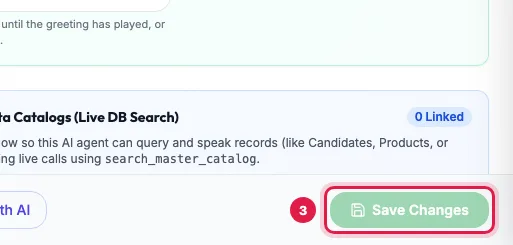
Panel के नीचे Save Changes पर क्लिक करें, फिर अपने फ़ोन पर एक test call करें।
VaaniAI is an AI voice agent platform built in India for Indian businesses. Its AI agents make and answer phone calls in Hindi, English, Hinglish, Tamil, Telugu and other Indian languages, qualify leads, book appointments and keep a built-in CRM up to date.
Pricing: From ₹9,999/month for 1 AI agent with 1 channel and unlimited calls, ₹24,999/month for 1 AI agent with 3 channels, or pay-as-you-go at ₹3.20/min of answered talk-time. Prices exclude 18% GST. Free trial: 3 days from your first call or 25 calls, whichever comes first.
Telecom: Dedicated Indian numbers, with national DND lists respected.